10 Google Review Card Ideas to Inspire Your Own Design
Looking for Google review card ideas? The best designs combine an attractive layout, a clear QR code, and a short message that makes customers feel appreciated. From minimalist business cards to playful, colorful designs, there are plenty of ways to create a review card that fits your brand.
A well-designed Google review card can do more than help customers leave reviews. It can double as a thank-you card, make asking for feedback feel less awkward, and give your business a thoughtful way to end each customer interaction.
Below are 10 design ideas, complete with example wording and suggestions for different types of businesses. Use them as inspiration for creating your own card—or choosing a personalized design that's ready to print.
1. Minimalist Google Review Cards
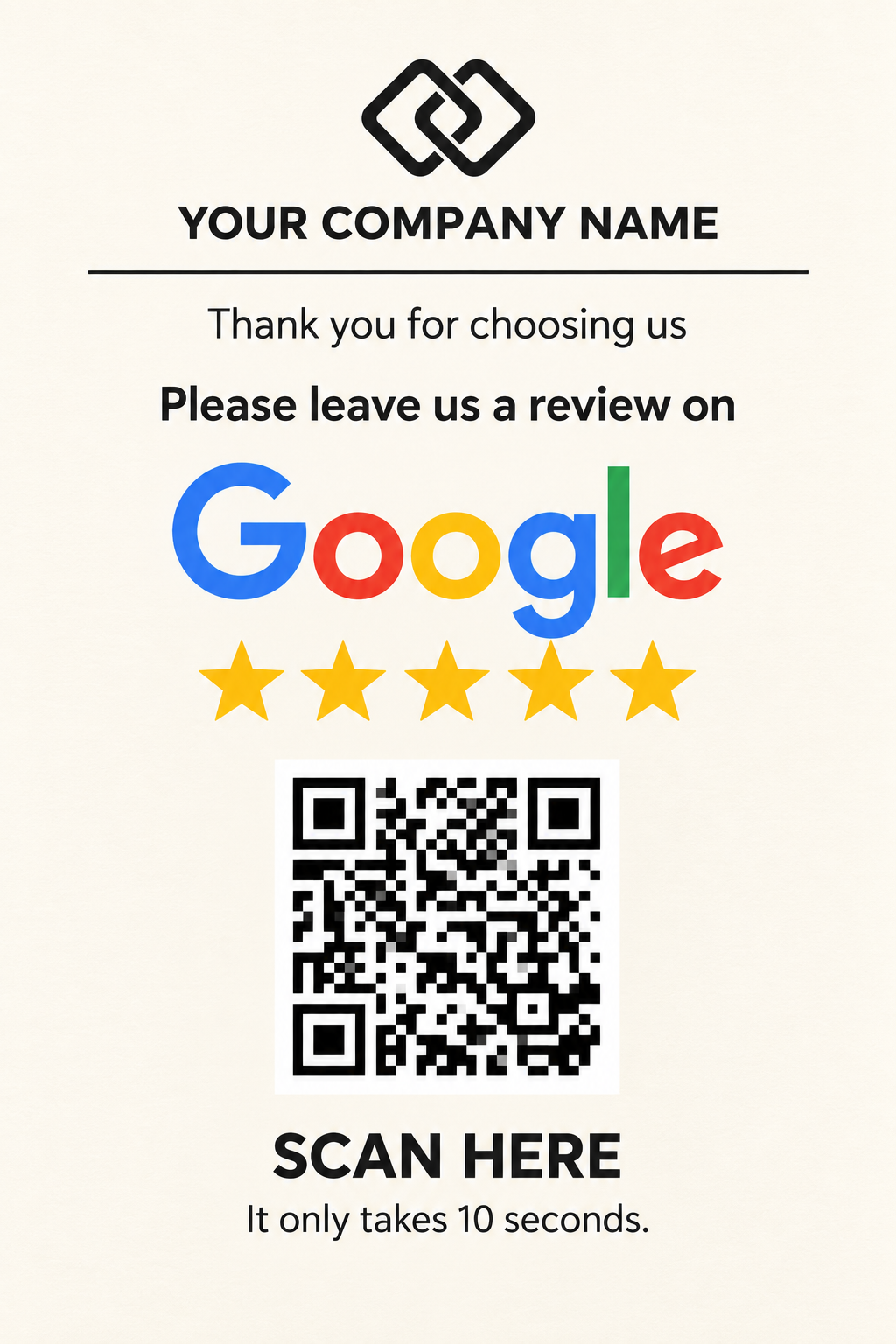
Minimalist designs focus on clarity. They use plenty of empty space, clean typography, and very few decorative elements.
A typical layout might feature a small business logo at the top, a short review invitation in the center, and a large QR code underneath.
Example wording:
Thank You for Choosing Us
We'd love to hear about your experience.
Scan to Leave a Google Review
Why This Design Works
The lack of visual clutter makes the message easy to understand and the QR code easy to find.
Minimalist cards are particularly useful when printing at business-card size, where space is limited.
Best for: Professional services, dental practices, consultants, medical offices, and businesses that prefer clean branding.
2. Elegant Thank-You Review Cards
This design puts gratitude first.
Instead of looking like a traditional review request, the card resembles a thoughtful thank-you note.
The headline is the most prominent element, while the review invitation and QR code appear beneath it.
Soft colors, subtle borders, and refined typography can help create a warm, personal appearance.
Example wording:
Thank You for Visiting Us!
It was a pleasure having you.
We'd love to hear about your experience.
Scan to Share Your Feedback on Google
Why This Design Works
The card feels like a natural extension of customer service rather than a direct request for something.
It can be particularly effective as a farewell gesture after an appointment or completed service.
The review invitation is still clear, but it doesn't dominate the message.
Best for: Beauty salons, spas, boutique hotels, wellness studios, and other service businesses that emphasize personal attention.
3. Bold and Colorful Google Review Cards
Not every review card needs to be subtle.
A colorful design can help your card stand out, especially in businesses with energetic or playful branding.
Use one or two dominant colors, a large headline, and a simple layout that directs attention toward the QR code.
The key is balancing visual impact with readability.
Example wording:
HEY, THANKS FOR STOPPING BY!
How was your visit?
Scan to Share Your Experience on Google
Why This Design Works
Bright colors can make the card more noticeable when it's placed on a counter or included in a shopping bag.
A distinctive design can also reinforce the business's personality.
Keep the QR code on a clear, high-contrast background rather than placing it directly over colorful patterns.
Best for: Cafés, ice cream shops, casual restaurants, creative studios, and independent retail stores.
4. Funny and Playful Review Cards
A little humor can make a review card more memorable.
The trick is to keep the joke relevant to the business and make sure customers still understand what the card is asking them to do.
For a coffee shop, for example:
Example wording:
Spill the Beans!
How was your coffee?
We'd love to hear what you think.
Scan to Leave a Google Review
Other businesses can adapt the concept.
A pet grooming salon might use a cute illustrated dog with the headline "We'd Love Your Paw-spective!"
A landscaping company could use "Did We Grow on You?" followed by a neutral invitation to share feedback.
Why This Design Works
A playful headline can catch attention and make the card feel more personal.
It also gives the business an opportunity to express its character without making the review request overly formal.
Avoid humor that pressures customers to leave a positive rating or makes negative feedback seem unwelcome.
Best for: Coffee shops, pet groomers, bakeries, casual restaurants, and businesses with friendly, informal branding.
5. Luxury-Style Google Review Cards
Luxury-inspired Google review cards use restrained colors, carefully chosen typography, and generous spacing.
Common design choices include charcoal, ivory, deep navy, and muted gold.
The goal is to create a premium appearance without making the card difficult to read.
Example wording:
Thank You for Your Trust
We appreciate the opportunity to serve you.
Your feedback is always welcome.
Share Your Experience on Google
Why This Design Works
A carefully designed card can reinforce the attention to detail customers associate with a premium service.
It also makes the thank-you gesture feel intentional rather than like a generic promotional handout.
For printed cards, matte or textured cardstock can complement the appearance.
Keep the QR code highly legible. A black QR code on a light panel is generally more reliable than a decorative metallic code.
Best for: Premium auto detailing, luxury spas, boutique hotels, interior design studios, and high-end service providers.
6. Handwritten-Style Thank-You Cards
Handwritten-style designs create the feeling of a personal note.
A script font can be used for the main thank-you message, while the remaining text stays simple and readable.
The card might feature a small illustration, a subtle paper texture, or a soft background color.
Example wording:
A Little Thank You From Us
We appreciate you choosing our business.
If you'd like to share your experience, we'd love to hear it.
Scan to Review Us on Google
Why This Design Works
A handwritten-style headline can make a printed card feel more personal, even when the same design is used for many customers.
It works especially well as a small insert included with purchases or handed over after a service.
Use decorative fonts sparingly. The QR code instructions should remain easy to read.
Best for: Florists, gift shops, bakeries, independent boutiques, craft businesses, and small family-run businesses.
7. Branded Google Review Business Cards
A branded review card uses the same colors, logo, and visual style as the rest of your business materials.
This makes it feel like part of your brand rather than an unrelated marketing item.
The card can resemble a traditional business card, with the review invitation occupying one side.
Example wording:
GREEN OAK LANDSCAPING
Thank You for Trusting Us With Your Property!
We appreciate your business.
Scan to Share Your Experience on Google
Why This Design Works
The card reinforces your business identity while serving a practical purpose.
It can also create a consistent closing routine.
For example, a landscaping contractor can hand over the card with the final invoice after completing a job.
Instead of introducing an awkward review request, the contractor has a natural way to thank the customer and leave behind a branded reminder.
Best for: Landscapers, HVAC contractors, plumbers, electricians, cleaning companies, roofing businesses, and other home-service providers.
8. Vintage-Inspired Google Review Cards
Vintage-inspired designs can give review cards a distinctive personality.
They might use retro typography, muted colors, classic borders, or illustrations inspired by older advertisements.
The challenge is to make the design nostalgic without making the information difficult to read.
Example wording:
Thanks a Bunch!
We appreciate your visit.
Tell us how we did.
Scan to Leave a Google Review
Why This Design Works
A retro design can reinforce the visual identity of a business that already uses vintage-inspired décor or packaging.
It can make the card feel like a natural part of the customer experience rather than a generic QR-code printout.
Keep the QR code modern, clear, and high-contrast, even when the rest of the design has an aged appearance.
Best for: Vintage shops, retro diners, barbershops, traditional cafés, artisan bakeries, and independent boutiques.
9. Industry-Specific Google Review Cards
One of the easiest ways to make a review card more relevant is to customize it for your type of business.
Instead of using generic wording, refer naturally to the service you've provided.
For example:
HVAC Company
Thank You for Trusting Us to Keep You Comfortable!
We appreciate your business.
Scan to share your experience on Google.
Restaurant
Thank You for Dining With Us!
How was your visit?
Scan to leave a Google review.
Hair Salon
Thank You for Visiting Our Studio!
We'd love to hear about your appointment.
Scan to share your feedback.
Why This Design Works
Industry-specific wording creates a stronger connection between the card and the customer's actual experience.
A heating technician leaving a thank-you card after repairing an air-conditioning system feels different from giving the customer a generic card that simply says "Review Us."
The first acknowledges the service relationship. The second is just a request.
Visual elements can also reflect the industry without overwhelming the design.
Best for: Any business that wants its review card to feel specifically created for its customers and services.
10. Creative Double-Sided Google Review Cards
A double-sided design separates the thank-you message from the review request.
The front can look like a traditional appreciation card, while the back contains the QR code and instructions.
Front:
Thank You for Choosing Us!
We truly appreciate your support.
[Business Logo]
Back:
How Was Your Experience?
We'd love to hear your feedback.
[QR Code]
Scan to Leave a Google Review
Why This Design Works
The design gives each message enough space.
The customer first receives a genuine thank-you gesture, then discovers a convenient way to share feedback on the other side.
It also prevents the QR code and review request from competing with the visual impact of the thank-you message.
A double-sided card can be especially useful when handed directly to customers at the end of a service.
Best for: Restaurants, salons, home-service businesses, hotels, boutiques, and businesses that want to make the customer farewell feel more personal.
How to Choose the Right Google Review Card Design
With so many Google review card design ideas available, the best choice is usually the one that fits your brand and the way customers interact with your business.
Consider three questions.
Does the design match your business?
A colorful, humorous design might feel natural in a coffee shop but out of place in a luxury spa.
Will customers understand what to do?
Even an attractive card needs a clear review invitation and an easy-to-find QR code.
Where will customers encounter the card?
A small card handed to customers can use different wording and layout from a larger card displayed at reception.
If you're unsure where to start, a clean design with a prominent thank-you message is a versatile choice.
Turn Your Favorite Design Idea Into a Personalized Review Card
Finding a design you like is one thing. Creating it, customizing it, generating the correct QR code, and preparing it for printing is another.
You can do all of that yourself using Canva or another design tool.
But if you already know the style you want, there's a simpler option.
ReviewCardsApp creates personalized digital Google review cards for small businesses without the DIY design work.
Instead of starting with a blank canvas or editing a template yourself, you choose a design and provide your business information and Google review link.
Your card is customized with your details and a QR code connected to your business's review page.
You receive a finished digital design that you can print and use with your customers.
There's no need to generate the QR code, position it inside a Canva template, or handle the customization yourself.
Explore Personalized Google Review Cards at ReviewCardsApp
If you're comparing different types of review products, our guide to the best Google review cards for business explains the differences between QR cards, editable templates, digital designs, and NFC products.
Why Thank-You Review Cards Can Work Better Than a Direct Review Request
The design isn't only about appearance. It also influences how customers experience the review request.
Imagine an HVAC technician who has just finished repairing a customer's heating system.
The technician explains the completed work, hands over the invoice, and asks:
"Could you leave us a Google review?"
It's a reasonable request, but it can feel slightly transactional.
Now imagine the technician hands over a branded thank-you card instead:
"Thanks for choosing us. Here's a little thank-you card from our company."
The card thanks the customer for their trust and includes a QR code inviting them to share their experience.
The request is still there. But it's presented as part of a thoughtful closing gesture rather than a separate favor.
This approach can solve several problems at once:
- It reduces awkwardness. Staff don't need to make a direct review-request pitch at every interaction.
- It shows appreciation. The customer receives a thank-you message before being invited to give feedback.
- It reinforces branding. The card carries the business's identity beyond the completed service.
- It makes reviews easier. The QR code takes customers directly to the appropriate Google review page.
- It creates a repeatable routine. Giving customers a thank-you card can become a normal part of finishing a transaction or service.
These are practical advantages, not a guarantee that every customer will leave a review.
The key is to make the gesture genuine and the review invitation optional.
When and How to Hand Customers Your Review Card
A well-designed card is most useful when it appears at a natural point in the customer journey.
Restaurants: Include the card with the bill or place it in the bill folder. The waiter can simply thank the guests for visiting.
HVAC Companies: Give the card to the homeowner with the completion paperwork after finishing a heating or air-conditioning service.
Cleaning Services: Include the card with the completion note or invoice.
Auto Detailers: Hand it over when returning the vehicle keys, alongside the usual thank-you.
Salons: Give the card to customers at reception after their appointment.
Retail Stores: Include it in the shopping bag with the receipt.
For staff, the introduction can be as simple as:
"Thank you for choosing us. Here's our thank-you card."
There's no need to ask the customer to scan it immediately or promise to leave a review.
Make the invitation available consistently to genuine customers, regardless of whether you expect their feedback to be positive.
Google allows businesses to request reviews but prohibits incentives, pressure, and selectively soliciting positive feedback. For more information, see Google's review policies.
A Few Design Details That Should Never Be Overlooked
Whatever style you choose, the card still needs to work.
Keep the QR code large enough to scan comfortably. Give it a clear background and sufficient empty space around its edges.
Use a short, understandable instruction such as "Scan to Leave a Google Review."
Make sure the QR code links to the correct Google review page, not just your website homepage.
And test the final printed version before distributing it to customers.
Also avoid wording such as "Give Us Five Stars" or "Leave a Positive Review." Invite honest customer feedback without suggesting a particular rating.
A visually attractive card is useful only if customers understand it and can use it easily.
Final Thoughts
The best Google review card idea is the one that feels like a natural part of your business.
A minimalist card may suit a professional office. A playful design may work better for a coffee shop. An elegant thank-you card can complement a salon, while a branded business card may be ideal for an HVAC contractor.
Whichever design you choose, remember that a Google review card can do more than direct customers to a review page.
It can thank them for choosing your business, reinforce your brand, and create a friendly closing gesture that employees can use consistently.
Start with a design that makes customers feel appreciated. Then let the QR code make sharing their experience easy.